This Post will explain, how to upgrade Ubuntu 12.04 to Ubuntu 12.10 in step by step Order.
Author assume that, user currently having 12.04 version in his/her machine.
Step 1


Step 4

Step 5

Author assume that, user currently having 12.04 version in his/her machine.
Step 1

Open up Update manger, you can achieve it by typing "Update manger" in "Dash Home".
Step 2
In the Update Manger, user can find "Settings" Button, Click it.
Step 3
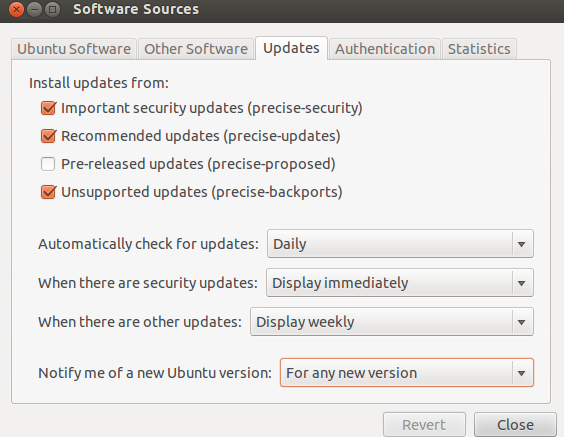
Select "Updates" Tab.

Select "For any new version" option form drop down available in "Notify me of a new Ubuntu version" and close the settings.
Now it is possible to see, New option in "Update Manger".
Click "Upgrade" in order to upgrade your system to "Ubuntu 12.10"

