Saturday, October 28, 2017

GUMPS Landing Checklist

GUMPS Landing Checklist
Read More on

https://medium.com/@vanjikumaran/gumps-landing-checklist-79f779cc5ece

White-Listing IPs in WSO2 API Manager

White-Listing IPs in WSO2 API Manager 


More details on 

https://medium.com/@vanjikumaran/white-listing-ips-in-wso2-api-manager-d6f2cca8d1e7

Friday, July 22, 2016

Change the authentication error message based on Accept Header in WSO2 API Manger

When you send the request with Accept header and the api call failed due to authentication failure, by default WSO2 API Manager will return the application/xml as a response. However, If you want your Accept header to be honored in the authentication failure cases. In my sample, I have just introduced to handle JSON and default as XML.


Thursday, January 28, 2016

Microservices Framework for Java By WSO2

Microservices Framework for Java implemented by WSO2 currently available for developer preview and very soon WSO2 will release the WSO2 Microservices Framework 1.0.0. Based on facts WSO2 Microservices Framework is lightweight high performance runtime implemented on Java for java developers who are looking for compressive framework.


WSO2 Microservice Framework code base is free and open source that available in WSO2 Github repository 

Tuesday, January 26, 2016

Fail safe Mode in WSO2 ESB / WSO2 API manger

By default WSO2 ESB/APIM servers will start in fail Safe mode by ignoring the failure of artifacts. Server will rename the failed artifact with .back file and move forward with rest of the artifacts. However there are situation where you do not want to deploy the server even a single artifact fails, This is typical situation in micro services concept. 


By disabling the fail safe mode in WSO2 ESB/APIM, it is possible not to deploy all the services even a single artifacts get fails during the deployment.


Add failsafe.mode.enable=false in WSO2_HOME/repository/conf/synapse.properties

Monday, November 2, 2015

Managing multiple Java versions in Mac

As java developer you may have to deal with more than on version of the JDKs. Therefore you might have to switch with JDK 1.8 to 1.7 and vice versa!!

Jenv allow you to manage your java version very easily.


1) Install Home brew
2) Install Jenv
3) Configure your Jenv
4) Put relavent alias to invoke Jenv!

You are done!!!!


In .bash_profile file my alias to invoke the jenv


PS- i really do not want to rewrite what Jenv does. Please read on Jenv :)

Wednesday, October 21, 2015

Hobbs time and Tach time

Hobbs Time
The Hobbs clock is started and stopped based on an oil pressure switch. Therefore, it starts when the engine starts, and stops when the engine is shut-down. While it's running, it just ticks off a tenth of an hour every 6 minutes. Time while taxing same as cruising in Hobbs time meter.


Tach Time
The tach clock isn't really a clock at all, it doesn't measure time, it really measures engine revolutions. But it's calibrated such that a tenth of an hour of tach time is clicked off when the engine is at cruise RPM for 6 minutes. In other words, if the plane is at cruise RPM, the tach clock will be clicking off tenths of an hour at the same rate as the Hobbs clock, and the same as the watch on your wrist. But if the engine is idling at an RPM speed that's half of what cruise RPM is, then the tach clock will be running at half the speed of the Hobbs clock.


Relation - Tach vs Hobbs
So, for the tach clock, less "time" is clocked when the plane is idling on the ramp, or flying at low RPM. For short flights (where ramp idling time is a significant percentage of total time), and flights where you're doing a lot of pattern work (and thus operating at low RPM), tach time will be significantly less than Hobbs time.


PS:- Most of the content and image are taken from web. I am not the content owner.

Rename the the file name in linux

One of my dir i had lot of ".xml.back" files and i really want to convert all the files into ".xml"!!  and end-up with this [1] statement.

[1]
find . -name "*.xml.back" -exec bash -c 'mv "$1" "$(sed "s/\.xml.back$/.xml/" <<< "$1")"' - '{}' \;

Thursday, September 24, 2015

Exposing the WSO2 Admin service as REST service

There can be a situation where you want to invoke the wso2 admin services from your external custom management tool. This post is taking a single use case where, making the WSO2 admin service for blocking users as a REST service.

Debug Web application in tomcat with Intellij Idea

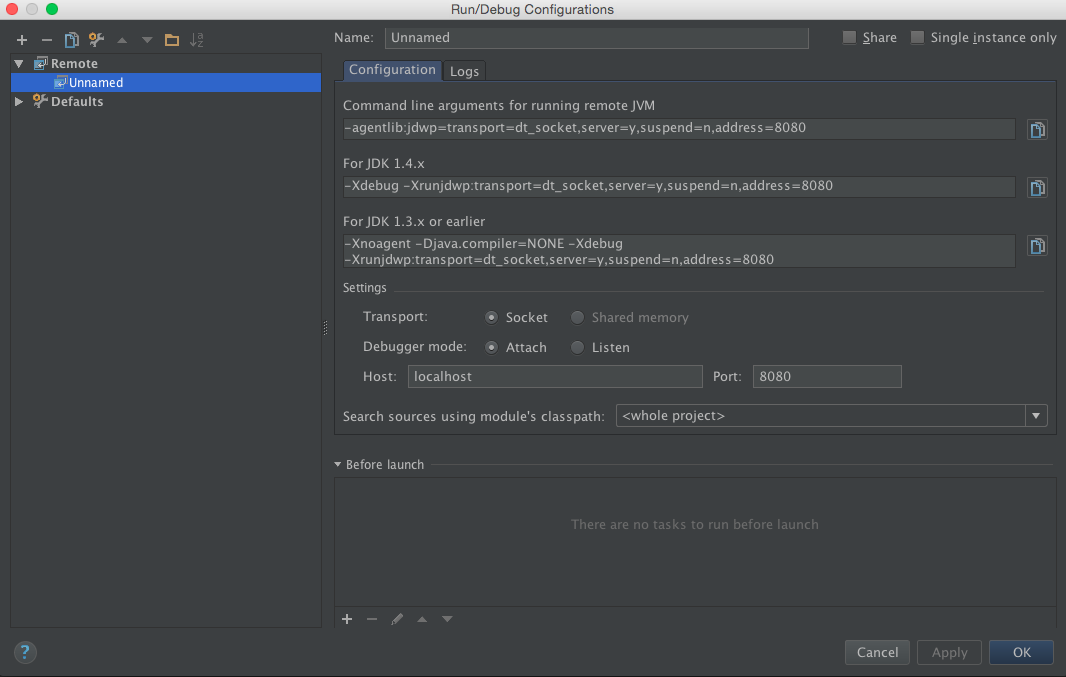
Tomcat facilitate the debugging capability with JPDA to web app developers and it explained in the official wiki of tomcat. However, document is not giving any explicit document for debugging with  Intellij Idea. Therefore in this blog, Step by Step guide is given to debug the web app hosted in tomcat with Intellij Idea.


Step 1
Export the JPDA port 
LM-SFA-00871979:apache-tomcat-7.0.64 vsivajothy$ export JPDA_ADDRESS="8080"

Step 2
Start the Tomcat server with JPDA

LM-SFA-00871979:apache-tomcat-7.0.64 vsivajothy$ bin/catalina.sh jpda start


Step 3

Create a remort debugging with Intellij Idea with port that given for JPDA.


Step 4
Run the project with 


Thursday, September 17, 2015

Recursively get the property value in synapse

There are certain situation that you may know only the one property name but there might be some other property


Interesting Pattern with single for loop!

Minimum loop required to print below Pattern (can be n*n).

4 4 4 4 4 4 4 
4 3 3 3 3 3 4 
4 3 2 2 2 3 4 
4 3 2 1 2 3 4 
4 3 2 2 2 3 4 
4 3 3 3 3 3 4 
4 4 4 4 4 4 4 

Thursday, April 23, 2015

WSO2 ESB send same request to different Rest services

In this scenario I need to send a post request to two different REST services, I am using REST API configuration of WSO2 ESB First I need to post a request to first service and based on successful posting then need to post this same original request to another service and also But I need to obtain the response from first service and send it to client.However I do not need to obtain the response from second service.

I have illustrate this scenario in the simple flow diagram.


Relevant Synapse configuration.


Monday, April 20, 2015

Simple http based file sharing server with in a second!

Recently i have come across a situation where I have to quickly need to share a file with my colleague and i did not had any ftp servers or any portable devices with me at that time!

So instance solution.... use Python!!!! if you have already installed the python in you machine.

Go to the directory that you want to share your files
Run "python -m SimpleHTTPServer 8000"

Then give your IP address to your friend and Now he can access your directory via browser ::)

Tuesday, March 31, 2015

Invoking WSO2 ESB proxy which uses Entitlement Mediator to evaluate a XACML rule in the WSO2 Identity Server in WSO2 Stratos 1.6

In this blog, I am assuming that you have an understanding on XACML Policy Language and use of WSO2 Stratos 1.6


This it the full synapse configuration that has been used in this sample.

Wednesday, February 18, 2015

WSO2 ESB SOAP headers lost

 During the connector and we experience some of the SOAP header information are being dropped by the ESB.

Please find the retrieved SOAP headers from direct API call and ESB call below.

Response from Direct API call
Response from ESB call
   <soap:Header>
      <wsa:Action>RetrieveResponse</wsa:Action>
      <wsa:MessageID>urn:uuid:7607e97e-463e-4fa2-92e9-afb48b90acda</wsa:MessageID>
      <wsa:RelatesTo>urn:uuid:a7ddc645-63fa-471b-8dad-e5a7909e25a2</wsa:RelatesTo>
      <wsa:To>http://schemas.xmlsoap.org/ws/2004/08/addressing/role/anonymous</wsa:To>
      <wsse:Security>
         <wsu:Timestamp wsu:Id="Timestamp-abd7433b-821f-4a23-861e-83ade6857961">
            <wsu:Created>2015-02-17T11:39:37Z</wsu:Created>
            <wsu:Expires>2015-02-17T11:44:37Z</wsu:Expires>
         </wsu:Timestamp>
      </wsse:Security>
   </soap:Header>
<soap:Header>
      <wsse:Security>
         <wsu:Timestamp wsu:Id="Timestamp-ec0a6c73-4633-437a-a555-6482f6a72f5d">
            <wsu:Created>2015-02-17T11:57:44Z</wsu:Created>
            <wsu:Expires>2015-02-17T12:02:44Z</wsu:Expires>
         </wsu:Timestamp>
      </wsse:Security>
   </soap:Header>


We can observe that the API is returning complete set of header information to the ESB in wire log, yet ESB returns only a selected set from it as shown above.

Reason for this issue is WS Addressing headers are removed while sending out. This can be solved by introducing Synapse Property "PRESERVE_WS_ADDRESSING" ( <property name="PRESERVE_WS_ADDRESSING" value="true" scope="default" /> )

Further detail can be found in [1]

Friday, January 30, 2015

WSO2's 6th Office opened in Jaffna

WSO2 has opened a office at Jaffna with 10 employees including 9 software engineers


Wednesday, December 10, 2014

Remove the payload and send POST request to backend via wso2 esb

There are situations where back-end does not need a payload for POST request. However in wso2 ESB has the payload that mediate before the back-end call. In order to drop the message payload you need to perform two tasks in the wso2 ESB.


Example is given below that demonstrate the use case. 

Tuesday, December 9, 2014

Bind WSO2 Mamanement Console to a certain IP Adress

There are lot of Security measures when deploy the WSO2 Server products. One of them is to restrict the accessibility of the server for certain IP addresses.

In WSO2 serves, it is possible to restrict via the the tomcat valve.

Edit
/repository/conf/tomcat/context.xml 


Add
<Valve className="org.apache.catalina.valves.RemoteAddrValve" allow="127\.0\.0\.1"/ >

How to delete the element in the array of json object in Java-script

Recently we had a very basic requirement to delete an key value pare in the json array using Javascript.


Input data

{"invideoPromotion":{"items":[{"id":{"type":"video","videoId":"11","websiteUrl":""},"timing":{"type":"ms","offsetMs":"2222"},"customMessage":"aa","promotedByContentOwner":"vanji"}]}}

Expected business logic

When type of id is video and websiteUrl is null; websiteUrl should be removed from the payload.

Output data

{"items":[{"id":{"type":"video","videoId":"11"},"timing":{"type":"ms","offsetMs":"2222"},"customMessage":"aa","promotedByContentOwner":"vanji"}]}}

In-order to do this you can use delete functionality of the json in javascript.

Example code