Showing posts with label Web Application. Show all posts

Thursday, September 24, 2015

Debug Web application in tomcat with Intellij Idea

Tomcat facilitate the debugging capability with JPDA to web app developers and it explained in the official wiki of tomcat. However, document is not giving any explicit document for debugging with  Intellij Idea. Therefore in this blog, Step by Step guide is given to debug the web app hosted in tomcat with Intellij Idea.


Step 1
Export the JPDA port 
LM-SFA-00871979:apache-tomcat-7.0.64 vsivajothy$ export JPDA_ADDRESS="8080"

Step 2
Start the Tomcat server with JPDA

LM-SFA-00871979:apache-tomcat-7.0.64 vsivajothy$ bin/catalina.sh jpda start


Step 3

Create a remort debugging with Intellij Idea with port that given for JPDA.
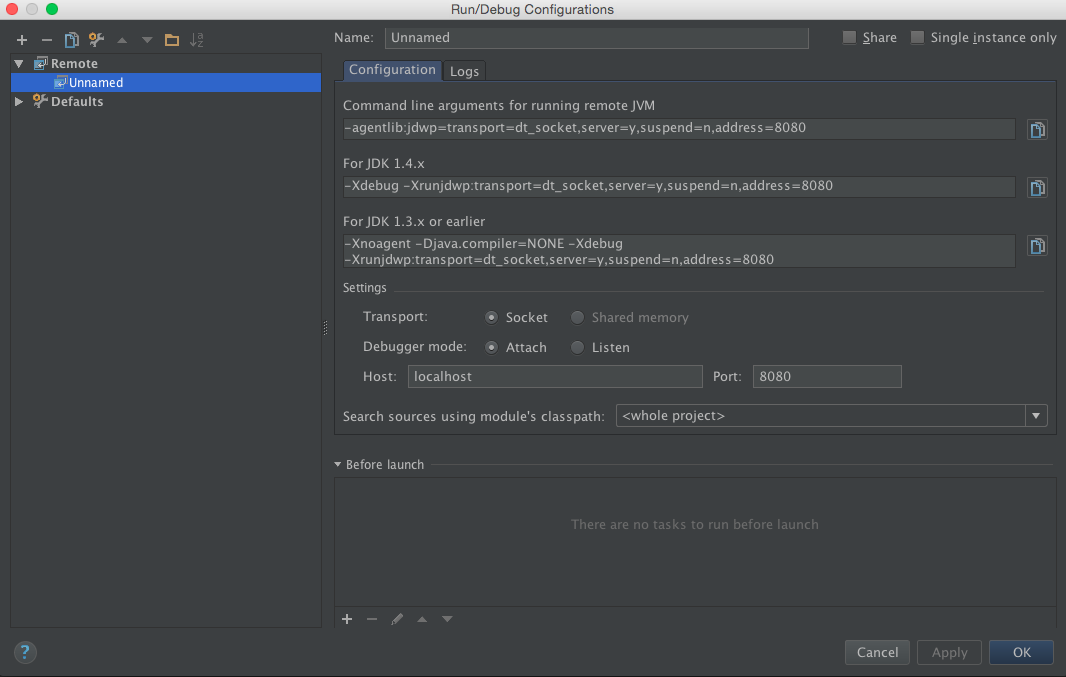


Step 4
Run the project with 


Saturday, November 2, 2013

Upload a file Using JSP

This demonstration will guide you, how to upload a file into folder (you can define the path) using JSP.

Pre-Request

Application server - I am using Wso2 Application Server. Since it is very user friendly to configure and mange my application using cool user interfaces.

Further Readings,
[1]http://wso2.org/library/articles/2012/10/getting-full-features-apache-tomcat-supported-wso2-application-server
[2] http://docs.wso2.org/wiki/display/AS510/Installation+Guide

Maven - As build tool i am using.

Further Readings,
[1] http://vanjikumaran.blogspot.com/2013/04/installing-maven-and-ant-in-ubuntu.html

let see the codes


Monday, April 1, 2013

Create a Web Application project using Maven


This post i will briefly guide you how to create a simple web Application using maven tool.

Since i am using intellij IDEA As IDE, by default the project that i am creating will be created in the "IdeaProjects" directory.

In order to demonstrate this task, i am creating a web app called SampleWebApp.

mvn archetype:create 
-DarchetypeGroupId=org.apache.maven.archetypes 
-DarchetypeArtifactId=maven-archetype-webapp 
-DarchetypeVersion=1.0 
-DgroupId=com.sample.test 
-DartifactId=SampleWebApp 
-Dversion=1.0-SNAPSHOT


As a result of running above given code snippets in the terminal or cmd, you will get bellow directory and file structure. This automated process is reducing the workload of the developer.


Now you can use your IDE to open up the projects and start coding.


for further reading about maven
[1]http://maven.apache.org/guides/introduction/introduction-to-archetypes.html
[2]http://www.sonatype.com/books/mvnref-book/reference/