Wednesday, October 21, 2015

Hobbs time and Tach time

Hobbs Time
The Hobbs clock is started and stopped based on an oil pressure switch. Therefore, it starts when the engine starts, and stops when the engine is shut-down. While it's running, it just ticks off a tenth of an hour every 6 minutes. Time while taxing same as cruising in Hobbs time meter.


Tach Time
The tach clock isn't really a clock at all, it doesn't measure time, it really measures engine revolutions. But it's calibrated such that a tenth of an hour of tach time is clicked off when the engine is at cruise RPM for 6 minutes. In other words, if the plane is at cruise RPM, the tach clock will be clicking off tenths of an hour at the same rate as the Hobbs clock, and the same as the watch on your wrist. But if the engine is idling at an RPM speed that's half of what cruise RPM is, then the tach clock will be running at half the speed of the Hobbs clock.


Relation - Tach vs Hobbs
So, for the tach clock, less "time" is clocked when the plane is idling on the ramp, or flying at low RPM. For short flights (where ramp idling time is a significant percentage of total time), and flights where you're doing a lot of pattern work (and thus operating at low RPM), tach time will be significantly less than Hobbs time.


PS:- Most of the content and image are taken from web. I am not the content owner.

Rename the the file name in linux

One of my dir i had lot of ".xml.back" files and i really want to convert all the files into ".xml"!!  and end-up with this [1] statement.

[1]
find . -name "*.xml.back" -exec bash -c 'mv "$1" "$(sed "s/\.xml.back$/.xml/" <<< "$1")"' - '{}' \;

Thursday, September 24, 2015

Exposing the WSO2 Admin service as REST service

There can be a situation where you want to invoke the wso2 admin services from your external custom management tool. This post is taking a single use case where, making the WSO2 admin service for blocking users as a REST service.

Debug Web application in tomcat with Intellij Idea

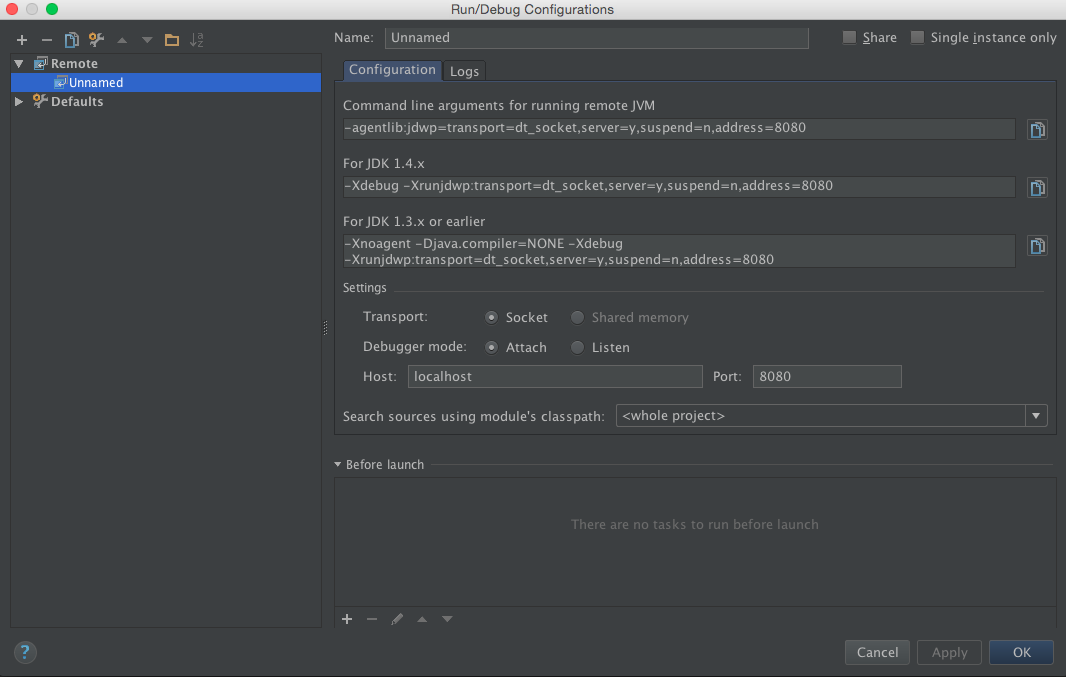
Tomcat facilitate the debugging capability with JPDA to web app developers and it explained in the official wiki of tomcat. However, document is not giving any explicit document for debugging with  Intellij Idea. Therefore in this blog, Step by Step guide is given to debug the web app hosted in tomcat with Intellij Idea.


Step 1
Export the JPDA port 
LM-SFA-00871979:apache-tomcat-7.0.64 vsivajothy$ export JPDA_ADDRESS="8080"

Step 2
Start the Tomcat server with JPDA

LM-SFA-00871979:apache-tomcat-7.0.64 vsivajothy$ bin/catalina.sh jpda start


Step 3

Create a remort debugging with Intellij Idea with port that given for JPDA.


Step 4
Run the project with 


Thursday, September 17, 2015

Recursively get the property value in synapse

There are certain situation that you may know only the one property name but there might be some other property


Interesting Pattern with single for loop!

Minimum loop required to print below Pattern (can be n*n).

4 4 4 4 4 4 4 
4 3 3 3 3 3 4 
4 3 2 2 2 3 4 
4 3 2 1 2 3 4 
4 3 2 2 2 3 4 
4 3 3 3 3 3 4 
4 4 4 4 4 4 4 

Thursday, April 23, 2015

WSO2 ESB send same request to different Rest services

In this scenario I need to send a post request to two different REST services, I am using REST API configuration of WSO2 ESB First I need to post a request to first service and based on successful posting then need to post this same original request to another service and also But I need to obtain the response from first service and send it to client.However I do not need to obtain the response from second service.

I have illustrate this scenario in the simple flow diagram.


Relevant Synapse configuration.